

Productive Pixie
This case study goes over the creation of a gamified
productivity application called Productive Pixie.
Introduction
January - April 2026
Solo Research, Design, and
Illustration Project
Productive Pixie is a study on the creation and psychology behind gamified applications, specifically productivity applications, and an exploration in accessibility and WCAG guidelines and best practices. It's a productivity application where the more time you spend focusing, the more pixie dust you gather to buy furniture to furnish your fairy home.
As someone who uses gamified productivity applications on a regular basis (Flora, Focus Friend, etc.), I wanted to explore designing my own accessible, easy to use one.
This case study is broken up into 3 sections:
Background Research
User Flows and Initial Wireframes
App Design and Figma Screens
Illustration
High Fidelity Wireframes
Hover and Focus States
Sticker Sheet
**All images of rooms, furniture, and pixie dust are hand drawn and owned by me
Background
Research
Citations
“20 Productivity App Gamification Examples.” Trophy, trophy.so/blog/productivity-gamification-examples#conclusion. Accessed 8 Apr. 2026.
Dutton, Damian. “How Gamification Wins the Marketing Game.” BeeLiked, 2 Nov. 2023, www.beeliked.com/blog/psychology-of-gamification.
“Gamification Definition & Meaning.” Merriam-Webster, Merriam-Webster, www.merriam-webster.com/dictionary/gamification. Accessed 8 Apr. 2026
“What Is Dopamine?” Mental Health America, 4 Nov. 2025, mhanational.org/resources/what-is-dopamine/.
Before starting my design process, I wanted to first understand the psychology behind gamification and why applications that employ it are so successful. So what is gamification? According to Merriam-Webster, gamification is "the process of adding games or game-like elements to something (such as a task) so as to encourage participation." (3) What makes gamification so impactful? I came across an article that described the impact like this, "Gamification isn't about playing games, but about engaging experiences...It takes consumers on an engaging journey, making each point earned...feel like a person victory." (2)
The article also delved into the dopamine rush that users receive while using the rewards systems in these games. "Each time users achieve a milestone or earn rewards in a gamified system, there's a release of dopamine."(2) Mental Health America defines dopamine as a hormone that "connects feelings of pleasure to behavior to motivate action." (2) They also mention that ADHD is caused by a dopamine deficiency, which can lead us to conclude that the reason why so many of these gamified productivity applications are marketed towards those with ADHD.
After learning about gamification and what makes it so appealing, I wanted to explore a few productivity applications that use gamification tactics. Some that I came across were:
Habitica: Where you gain XP by being productive and use that XP to unlock quests, customization, and other RPG like features (1)
Forest: Users are encouraged to be productive by planting virtual tress and gathering points to eventually be used to plant real trees (1)
Focus Friend: Help a bean focus on its knitting and use the things it knits to furnish its house
Focus Friend in particular stood out to me because it has a similar premise to what I'm designing. While there are many things that Focus Friend does very well, such as inclusive language, simple designs, easy to reach text, and different focus modes, I wanted to see what I could improve on. There were three things that I found that I wanted to focus on improving in my application, in comparison to Focus Friend.
Clutter: While the overall aesthetic of Focus Friend is clean and cozy, I found that the decorating screen was a little cramped and overwhelming. The furniture is already placed in the room, but pieces you need to decorate are blurred out. On top of the blurred furniture are large green + (plus) signs. In my opinion the design looked a bit cluttered, so I wanted to do something more organized. My solution was to create a store page, where all the furniture is clearly visible and spaced out.
Color Scheme: The color scheme of Focus Friend is the stereotypical cozy game scheme, lots of browns, greens, and muted blues. While that can be comforting, I wanted a color scheme that was a bit brighter and colorful, to set Productive Pixie apart from other cozy style productivity apps.
One Currency: Like other productivity applications and games, Focus Friend has two currencies, socks and scarves. While 2 currencies is not nearly as confusing as some apps with 4-5, I wanted to make Productive Pixie as easy to use and understand as possible, so I kept one currency, Pixie Dust.
User Flows and
Initial
Wireframes
Below are 2 user flows (one describing the timer process and one for purchasing furniture) and rough wireframe sketches.


App Design and
Figma Screens
This section discusses and showcases the app design process as well as the Figma screens of Productive Pixie. A link to the complete Figma prototype can be accessed here.
Illustration and
HiFi Wireframes
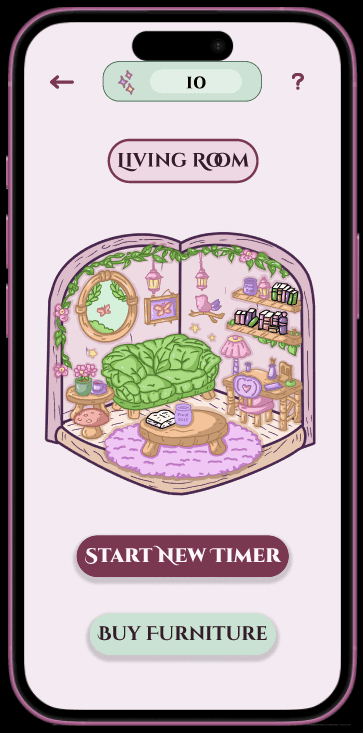
The beginning of Productive Pixie started with the illustrations. I started off with a basic room and began sketching and designing furniture as I went. It was important to me to have a very clear aesthetic in mind. Something energetic but not too bright, tying in a mix of colors that are easily visible without being neon. But at the same time, I didn’t want to adhere to the same color scheme as other “cozy” applications. So I settled with the color scheme shown in the wireframes below this section.
After completing the illustration and coloring process, I began desinging in Figma. It took a few iterations but I was able to get the simple, fairy-like aesthetic I was aiming for. The images below show a few wireframes from the completed Figma file, found here.



Focus and Hover States
and Sticker Sheet
Something that I wanted to implement in this design were focus states. I wanted there ot be a clear indication of what is selected for those aren’t able to press the buttons on the screen (triggered by pressing Tab if using a keyboard) or those suing screen readers. In addition, I added hover states. Both of these are added as practice/simulation if the application is being run on a computer or being used with a mouse, keyboard, or other assistive device. On the bottom of this page you’ll see a sticker sheet displaying the different states of each button as well as the artwork and fonts used in the application.
A full prototype of the application can be found at the following link:

mkmuqri@gmail.com
Made by Maherah